How to Use Sanctuary Reader Guide
📖 Open Reader →
“Solitude isn’t lonely when it’s the gift He gave.” · Software that lives where you do.
For His Grace Sanctuary Reader · Product Report & Visual Guide
📖 Launch Sanctuary Reader →
📘 Official Product Report & Field Guide Desktop 3-Pane + Mobile 3-Layer Touch 100% Local-First · Zero Ads

The 3-Column Sanctuary Reader: Complete Feature Report & Visual Instructions

Designed for unhurried personal study and small-group preparation, the For His Grace Sanctuary Reader unites all 66 books and 1,189 chapters of Scripture with instant 3-column translation comparison (BSB, KJV, and *FHG-SP Sanctuary Plain), 660 4-Layer Grace study lessons, 6 Signed Studio Art editions, and a 100% on-device Reflection Vault that prints single-chapter Fellowship Prep Sheets for free.

💡 Tip: Click any annotated screenshot below to open its full-resolution 2x Retina diagram, or click “⚡ Try This Feature Live” on any card to launch the Sanctuary Reader directly in that state.
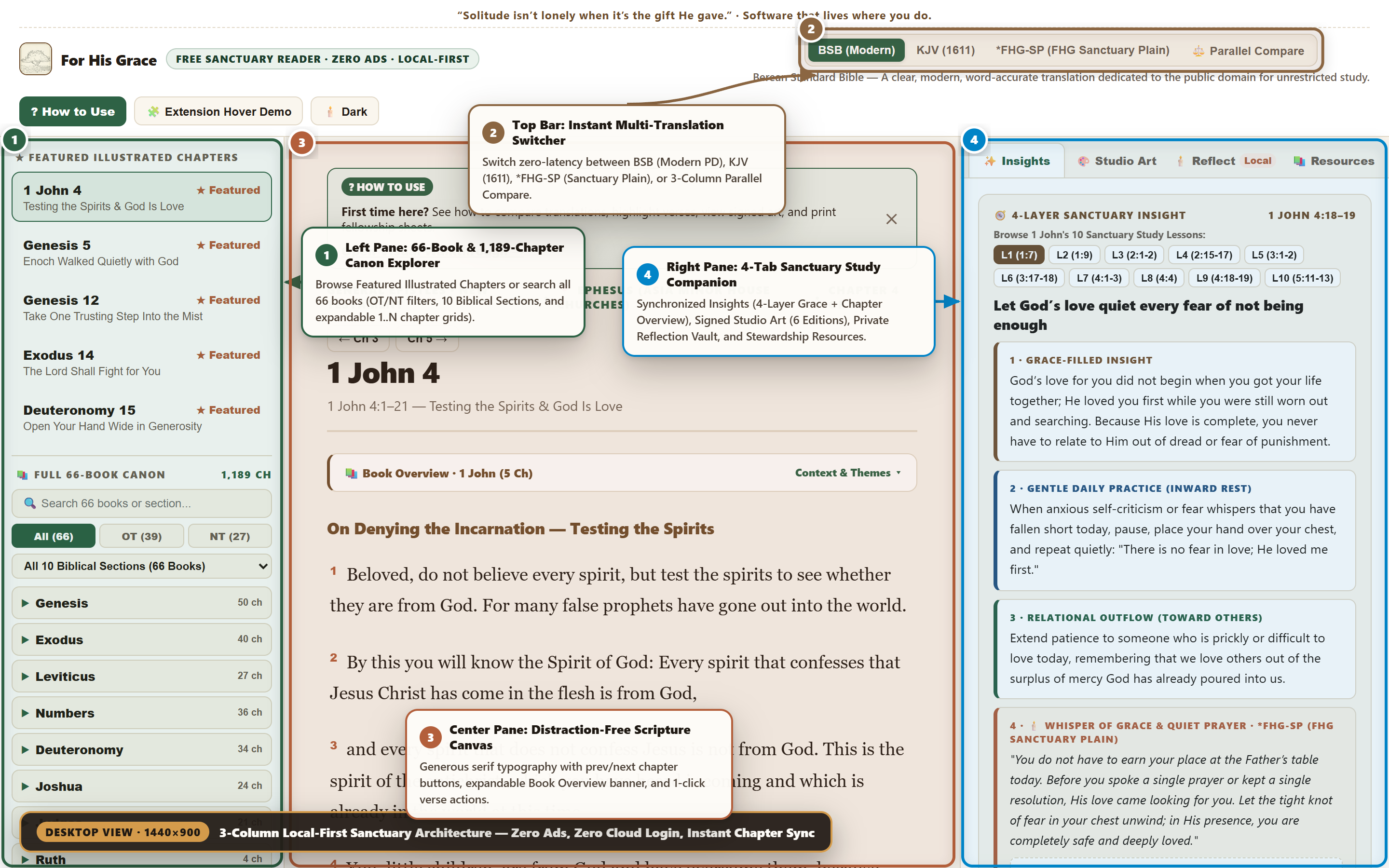
Sanctuary Reader 3-Pane Desktop Architecture Overview with Annotated Callouts
🖥️ Live Playwright Snapshot · 3-Pane Desktop Workspace (1440×900 @ 2x)
Full Protestant Canon
66 Books · 1,189 Ch
Instant search, OT/NT filters, 10 Biblical Sections, and expandable chapter grids.
Multi-Translation Bar
3 Texts + Parallel
BSB (Modern PD), KJV (1611), *FHG-SP (Sanctuary Plain — JMC), & 3-Column Compare.
4-Layer Grace Spine
660 Study Lessons
10 lessons per book (L1–L10) + 1,189 Chapter Overviews & Public Domain footnotes.
Signed Studio Art
6 Art Editions
Ink-Wash, Risograph Earth, Ukiyo-e, Terra & Pine, Prussian Blue, & Loop Scribble.
Chapter Commentary
1,189 Overviews
Verse-cluster outlines, plain-language exposition, lexical stats, & PD footnotes.
Private & Print-Ready
100% Local-First
On-device Reflection Vault + free PDF/HTML Fellowship Prep Sheet printouts.
Step-by-Step Visual Field Guide

Annotated Desktop & Mobile Instructions

Generated directly from the live Sanctuary Reader DOM using the 864zeros Playwright Snapshot & Vector Callout Engine. Match the numbered badges (① ② ③ ④) on each screenshot with the step-by-step instructions on the right.

🔍 Click any diagram to inspect in full 2880×1800 Retina resolution
Desktop 01 of 08

3-Pane Sanctuary Workspace Overview

⚡ Try This View Live →
Desktop 01 — 3-Pane Sanctuary Workspace Overview
📐 Viewport: Desktop 1440×900 (@2x Retina) · Active Passage: 1 John 4 🔍 Click to Enlarge

On desktop screens, the Sanctuary Reader opens into a balanced 3-column workspace where your Bible navigation, Scripture text, and 4-tab Study Companion remain visible simultaneously without tab-juggling.

1
Left Pane — 66-Book & 1,189-Chapter Canon Explorer Jump to any of the 5 Featured Illustrated Chapters at the top, or search and filter all 66 books of the Old and New Testaments below.
2
Top Sanctuary Bar — Instant Multi-Translation Switcher Click BSB (Modern), KJV (1611), *FHG-SP (FHG Sanctuary Plain), or ⚖️ Parallel Compare to switch translations with zero page reload.
3
Center Pane — Unobstructed Scripture Canvas Read in calm Georgia serif typography with chapter-stepping buttons (← Ch 3 / Ch 5 →) and an expandable Book Overview banner.
4
Right Pane — Synchronized 4-Tab Study Companion Explore ✨ Insights, 🎨 Studio Art, 🕯️ Reflect, and 📚 Resources—all automatically locked to your active chapter.
Desktop 02 of 08

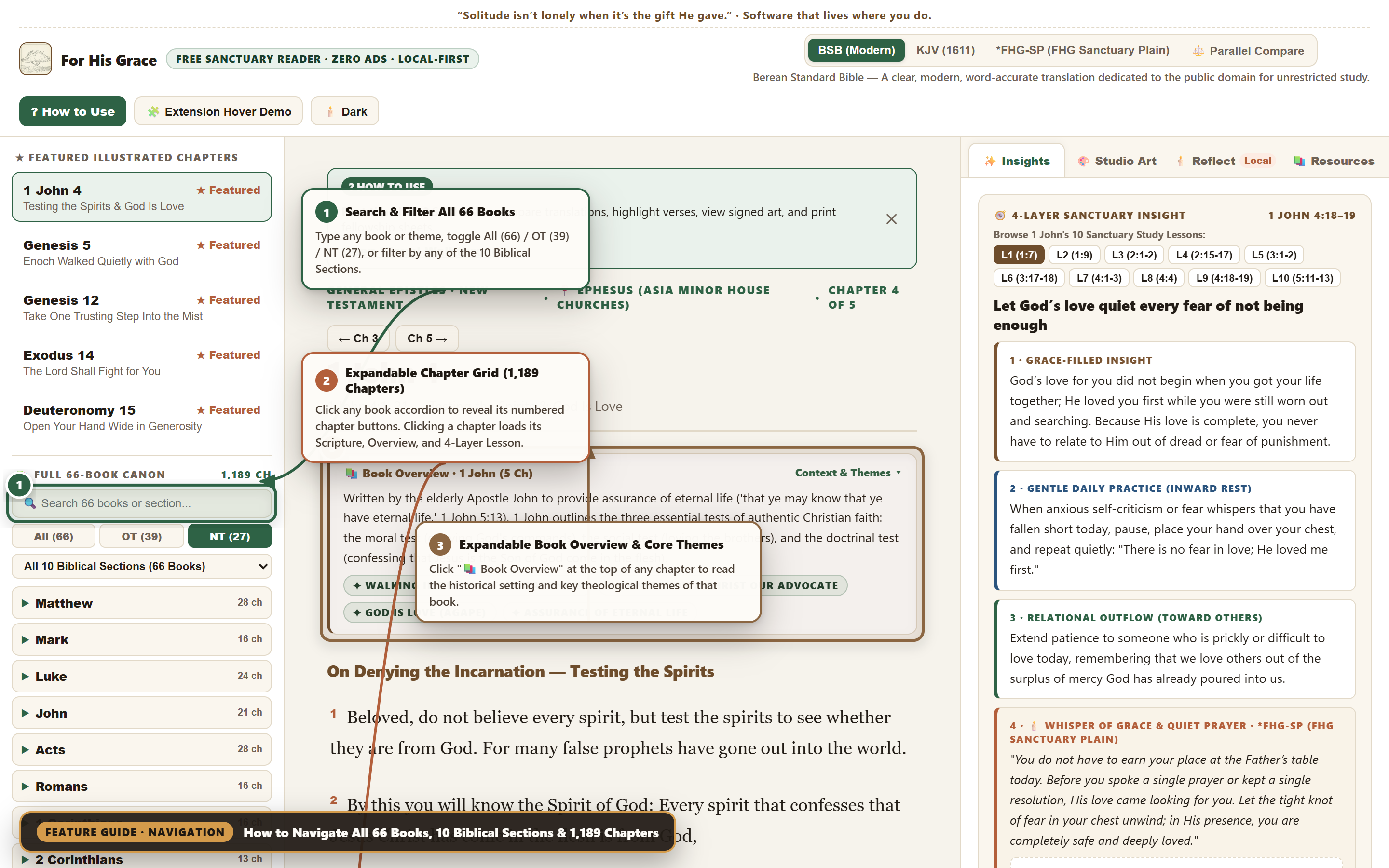
Navigating All 66 Books, 10 Biblical Sections & Book Overviews

⚡ Try Canon Explorer Live →
Desktop 02 — Navigating All 66 Books, 10 Biblical Sections & Book Overviews
📐 Viewport: Desktop 1440×900 (@2x Retina) · Canon Filter & Book Overview Expanded 🔍 Click to Enlarge

Every chapter of the Protestant Canon (39 Old Testament + 27 New Testament = 1,189 chapters) is indexed with historical context, literary division, and core theological themes.

1
Search & Filter All 66 Books Type any book name or keyword into 🔍 Search 66 books or section..., click All (66) / OT (39) / NT (27), or choose any of the 10 Biblical Sections from the dropdown.
2
Expandable Chapter Grid Accordion Click any book row in the left sidebar to open its numbered chapter grid (1..N). Clicking any chapter button loads its verses, commentary overview, and 4-Layer Grace lesson immediately.
3
Expandable Book Overview & Core Themes Banner Click 📚 Book Overview · Context & Themes ▾ above the chapter title to read the book’s historical background and core theological theme pills.
Desktop 03 of 08

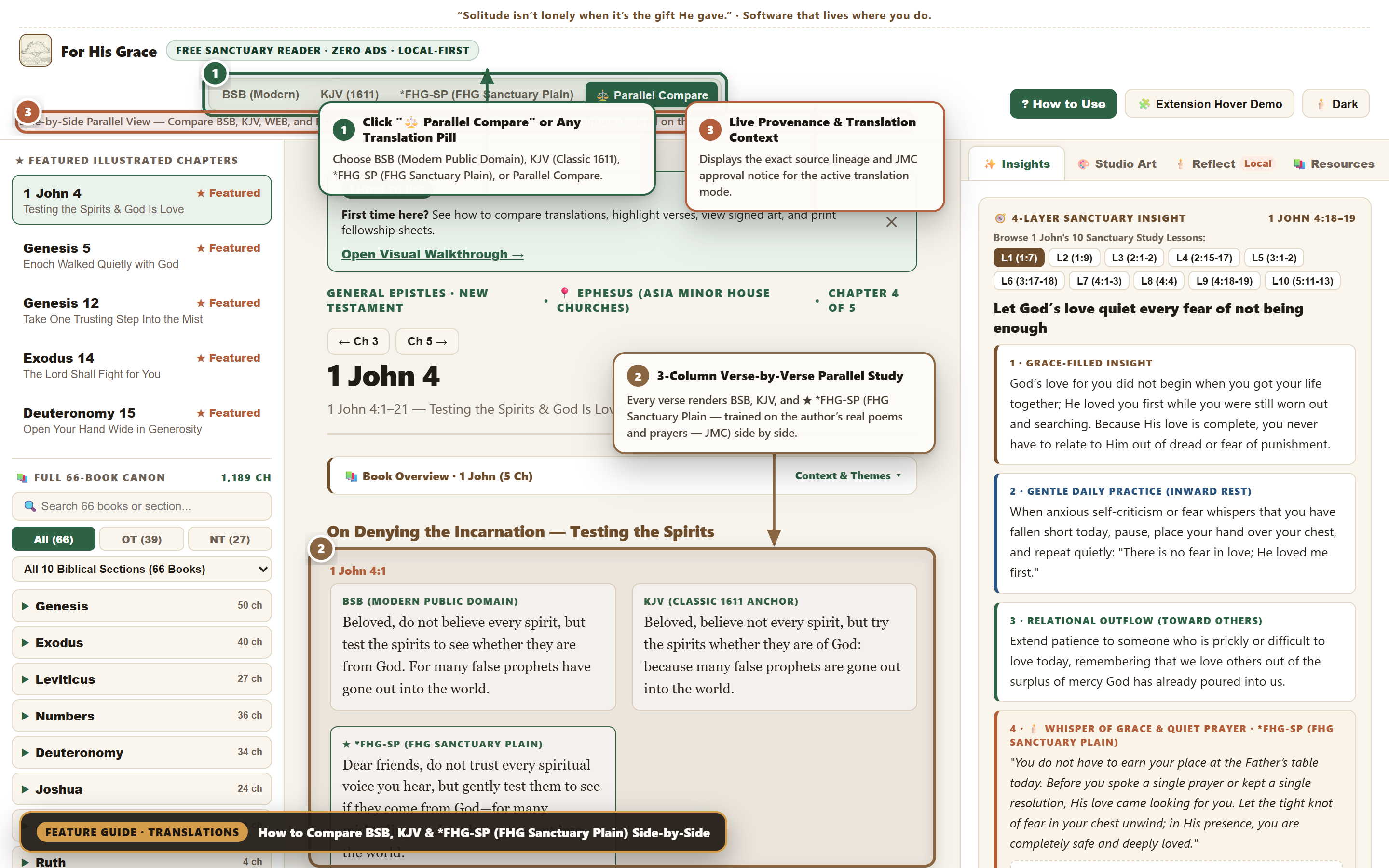
Multi-Translation Bar & 3-Column Parallel Compare (BSB · KJV · *FHG-SP)

⚡ Launch Parallel Compare →
Desktop 03 — Multi-Translation Bar & 3-Column Parallel Compare
📐 Viewport: Desktop 1440×900 (@2x Retina) · Mode: ⚖️ Parallel Compare 🔍 Click to Enlarge

Instead of opening multiple browser tabs to compare modern accuracy, classical cadence, and devotional plain speech, the Sanctuary Reader aligns all three side-by-side for every verse.

1
Select Any Translation or “⚖️ Parallel Compare” Click BSB (Modern), KJV (1611), or *FHG-SP (FHG Sanctuary Plain) for single-column reading, or click ⚖️ Parallel Compare for 3-column study.
2
Verse-by-Verse 3-Column Parallel Grid Every verse block displays BSB (top-left), KJV 1611 (top-right), and ★ *FHG-SP (FHG Sanctuary Plain) in a highlighted sanctuary card below.
3
Live Translation Lineage & JMC Provenance Notice Directly beneath the translation pills, a live subtitle confirms the copyright/public-domain status and JMC approval lineage of the active mode.
Desktop 04 of 08

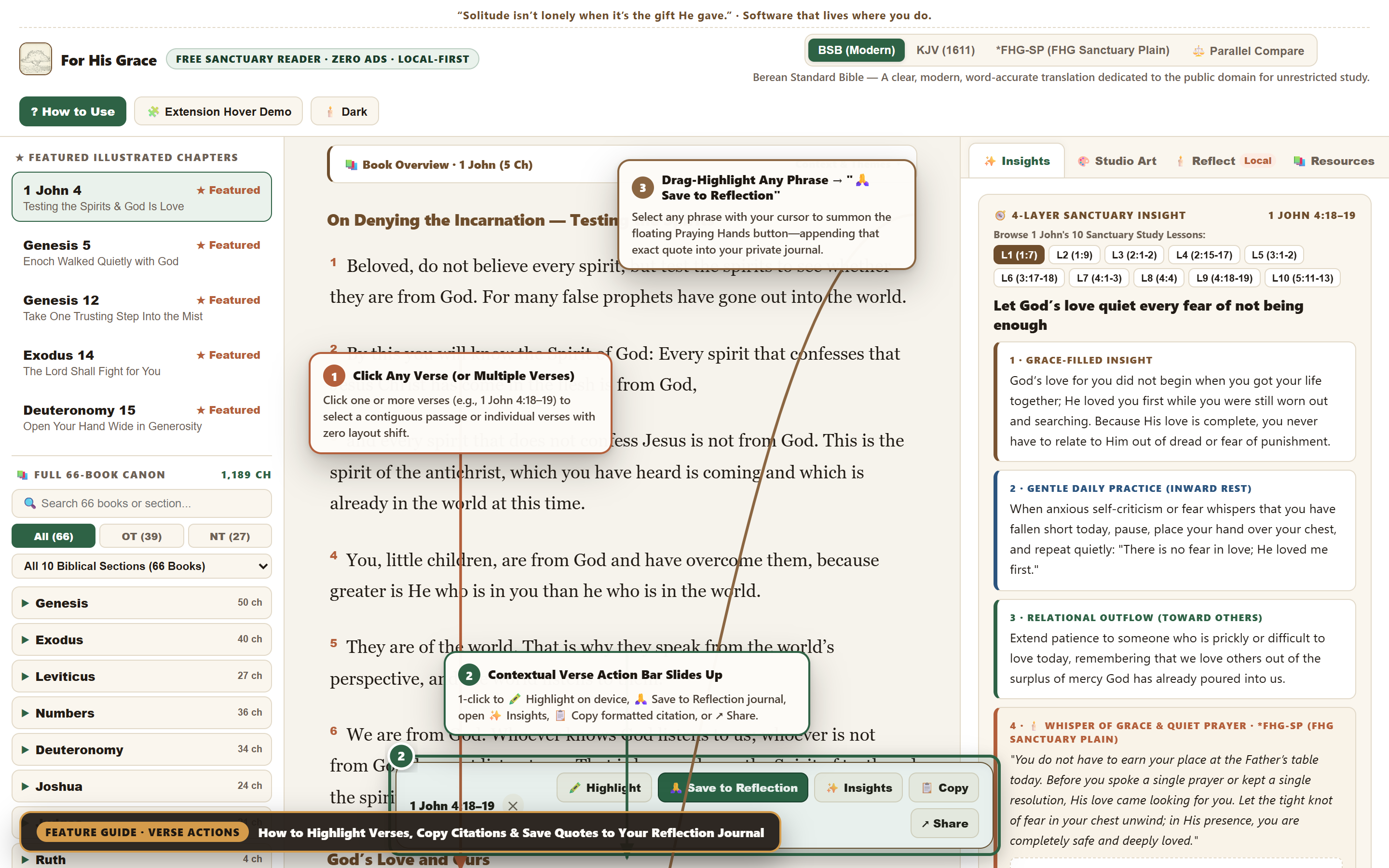
Verse Action Sheet & Drag-Highlight “🙏 Save to Reflection”

⚡ Try Verse Highlighting →
Desktop 04 — Verse Action Sheet & Drag-Highlight Praying Hands Popover
📐 Viewport: Desktop 1440×900 (@2x Retina) · Verses 18–19 Selected + Phrase Capture 🔍 Click to Enlarge

Capture any verse or phrase into your private journal in one click—either by clicking whole verse blocks or by drag-selecting specific words with your mouse cursor.

1
Click One or Multiple Verses to Select Click any verse (e.g., 1 John 4:18 and 4:19) to toggle selection. Selected verses glow in soft amber without shifting surrounding text.
2
Contextual Verse Action Sheet Slides Up Use the floating bar to 🖍️ Highlight persistently on your device, 🙏 Save to Reflection, jump to ✨ Insights, 📋 Copy a formatted citation, or ↗ Share.
3
Drag-Select Any Phrase → “🙏 Save to Reflection” Highlight any phrase with your cursor to summon the floating Praying Hands button right above your selection—clicking it appends that exact quote into your chapter journal.
Desktop 05 of 08

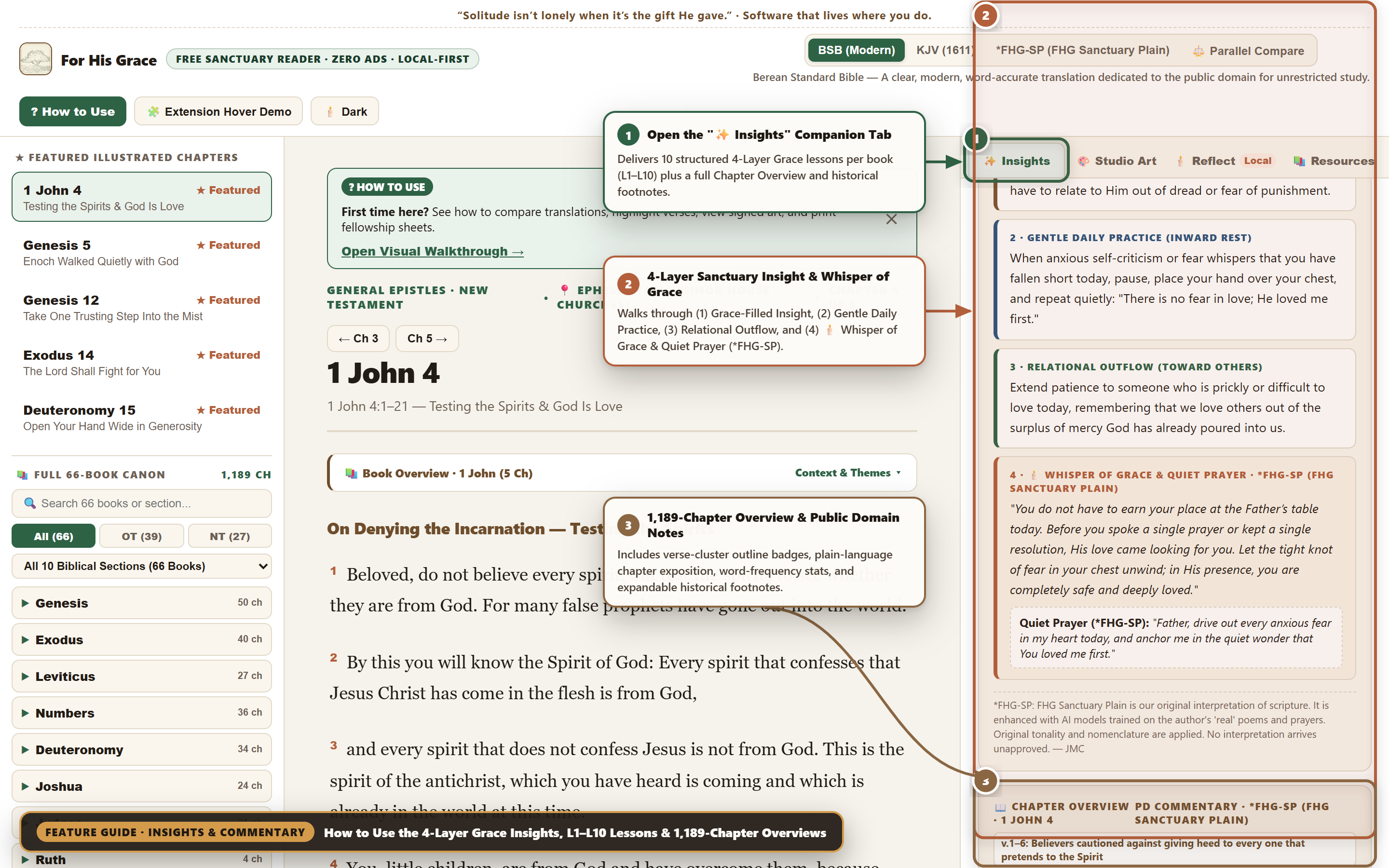
✨ Insights Tab: 4-Layer Grace, L1–L10 Lessons & 1,189-Chapter Overviews

⚡ Open Insights Tab Live →
Desktop 05 — 4-Layer Grace Insights, L1–L10 Lessons & 1,189-Chapter Overviews
📐 Viewport: Desktop 1440×900 (@2x Retina) · Active Tab: ✨ Insights & Chapter Overview 🔍 Click to Enlarge

The ✨ Insights tab pairs our signature 4-Layer Grace Framework (10 structured lessons per book) with 1,189-Chapter Public Domain Commentary Overviews and historical footnotes.

1
Open the “✨ Insights” Companion Tab Click ✨ Insights in the right companion header and use the L1–L10 pills to browse that book’s 10 Sanctuary Study Lessons.
2
4-Layer Sanctuary Insight & Whisper of Grace (*FHG-SP) Walk through (1) Grace-Filled Insight, (2) Gentle Daily Practice, (3) Relational Outflow, and (4) 🕯️ Whisper of Grace & Quiet Prayer (*FHG-SP).
3
1,189-Chapter Overview & Expandable Footnotes Scroll down inside ✨ Insights to read the verse-cluster outline pills, plain-language chapter exposition, word-frequency stat, and expandable historical footnotes (¹–⁵).
Desktop 06 of 08

🎨 Studio Art Tab: Exploring the 6 Signed JMC Art Editions

⚡ Explore Studio Art Live →
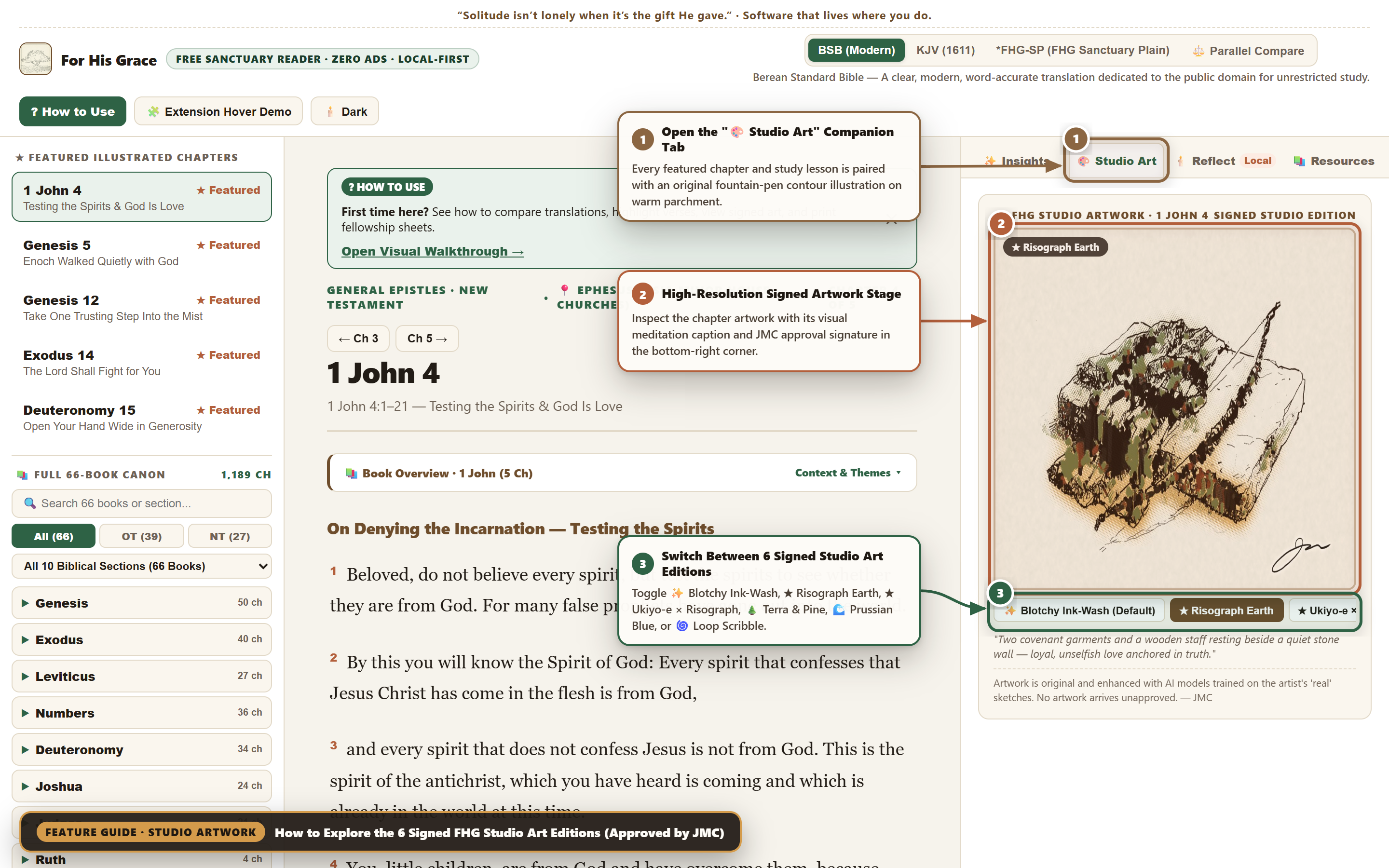
Desktop 06 — Studio Art Tab with 6 Signed JMC Art Editions
📐 Viewport: Desktop 1440×900 (@2x Retina) · Active Edition: ★ Risograph Earth 🔍 Click to Enlarge

Visual contemplation slows down hurried reading. Every featured chapter and study lesson includes a signed studio illustration rendered across six distinct printmaking and ink-wash editions.

1
Select the “🎨 Studio Art” Tab Click 🎨 Studio Art in the right companion header to open the high-resolution artwork stage for the current passage.
2
High-Resolution Parchment Stage & Signature Lock View the full-bleed illustration with its active edition badge in the top-left corner and the artist’s signature mark in the bottom-right corner.
3
Switch Between All 6 Signed Studio Editions Click any edition pill below the frame—✨ Blotchy Ink-Wash, ★ Risograph Earth, ★ Ukiyo-e × Risograph, 🌲 Terra & Pine, 🌊 Prussian Blue, or 🌀 Loop Scribble—and read the paired visual meditation caption.
Desktop 07 of 08

🕯️ Reflect Tab: Local-First Journaling & Free Fellowship Prep Sheet Printouts

⚡ Open Reflection Vault →
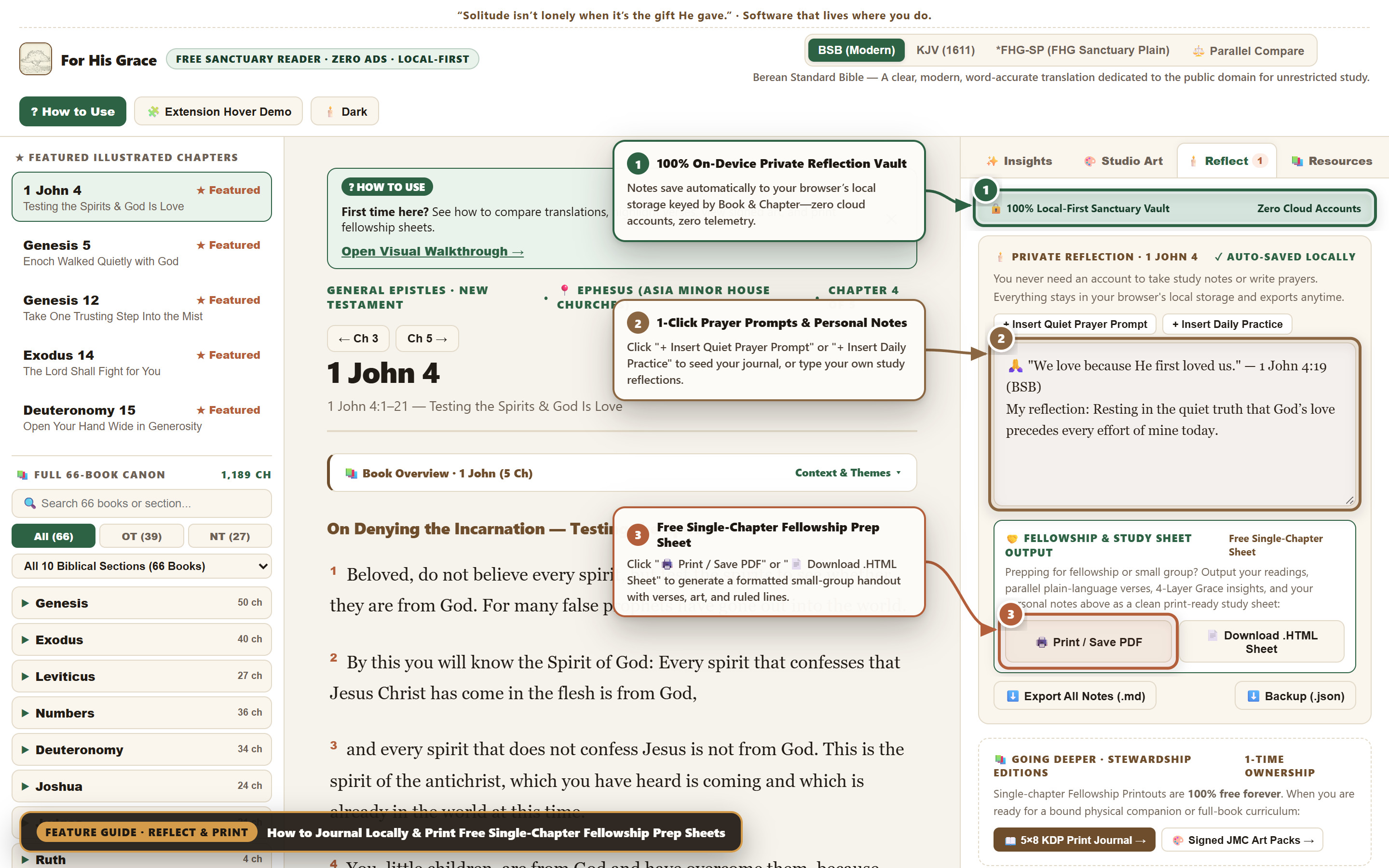
Desktop 07 — Local-First Reflection Vault & Free Fellowship Prep Sheet Exporter
📐 Viewport: Desktop 1440×900 (@2x Retina) · Active Tab: 🕯️ Reflect & Print 🔍 Click to Enlarge

Your prayers and reflections belong between you and God. The 🕯️ Reflect tab stores every keystroke locally in your browser and lets you print clean small-group handouts for free.

1
🔒 100% Local-First Sanctuary Vault Notes auto-save instantaneously to your browser’s localStorage keyed by book and chapter—zero accounts, zero cloud sync, zero tracking.
2
1-Click Prompt Seeders & Personal Notes Click + Insert Quiet Prayer Prompt or + Insert Daily Practice to seed your note with the chapter’s devotional prompt, or write freely.
3
Free Single-Chapter Fellowship & Study Prep Sheet Click 🖨️ Print / Save PDF or 📄 Download .HTML Sheet to generate a print-ready handout containing the chapter’s Scripture verses, 4-Layer Grace insights, Studio Art, your personal notes, and ruled lines for group discussion.
Desktop 08 of 08

🕯️ Sanctuary Dark Mode & Anywhere Web Extension Hover Simulator

⚡ Launch Dark Mode + Demo →
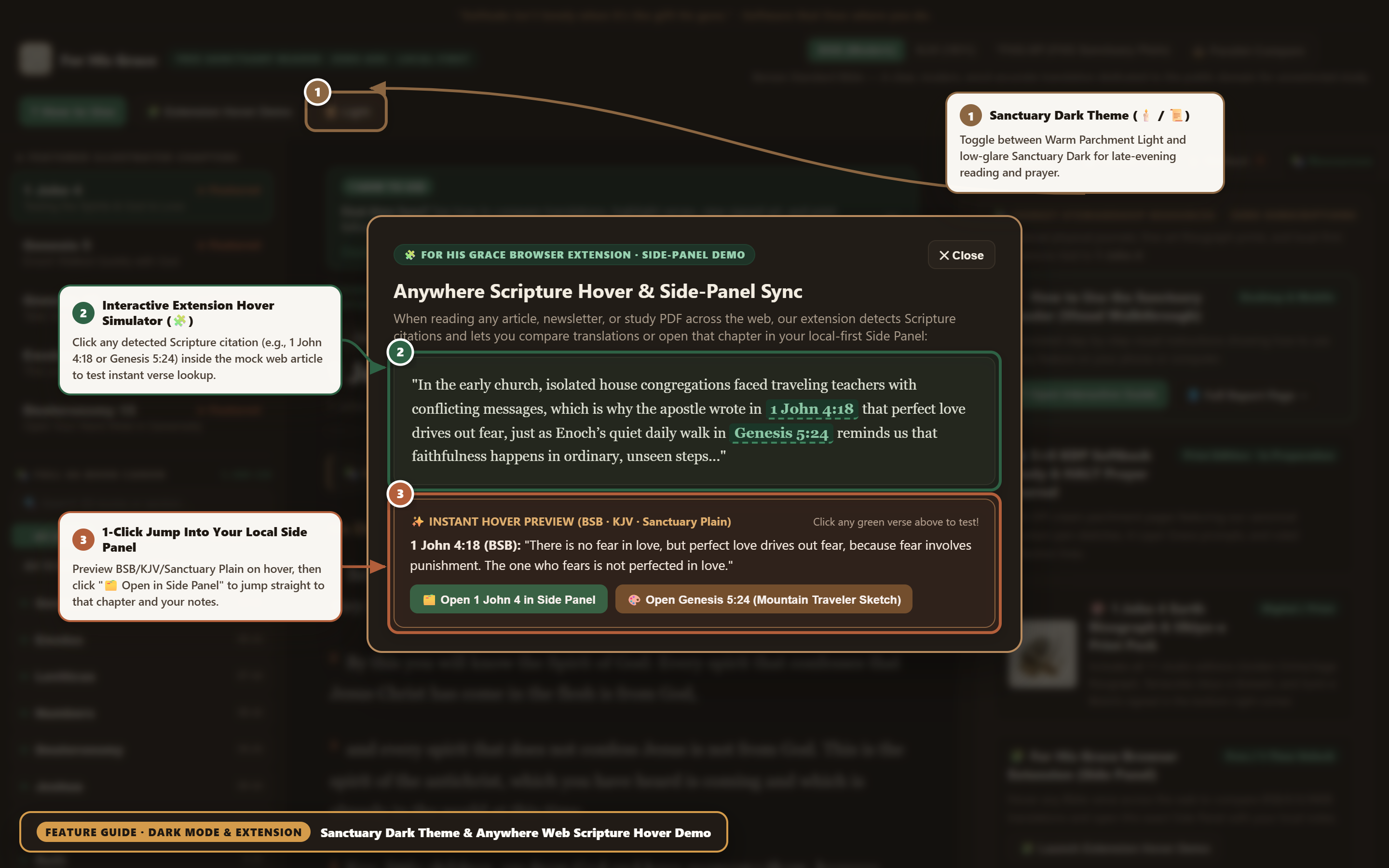
Desktop 08 — Sanctuary Dark Theme & Browser Extension Hover Simulator
📐 Viewport: Desktop 1440×900 (@2x Retina) · Sanctuary Dark + Extension Simulator 🔍 Click to Enlarge

Read comfortably late at night with Sanctuary Dark Mode, and preview how the upcoming For His Grace Browser Extension detects Scripture citations across any webpage.

1
Toggle Sanctuary Dark / Warm Parchment Light (🕯️ / 📜) Click 🕯️ Dark in the top bar to switch the entire workspace into a warm, low-glare espresso and muted-gold palette designed for evening prayer.
2
Interactive Extension Hover Simulator (🧩) Click 🧩 Extension Hover Demo in the top bar, then click any green Scripture citation (such as 1 John 4:18 or Genesis 5:24) inside the sample article.
3
1-Click Jump Into Your Local Side Panel Preview the verse in BSB, KJV, and Sanctuary Plain inside the hover card, then click 🗂️ Open in Side Panel to load that exact chapter and artwork in your reader.
📱 Phone-Friendly Vertical Cards (5 Steps)

How to Use the Sanctuary Reader on Your Phone

📖 Launch Mobile Reader →
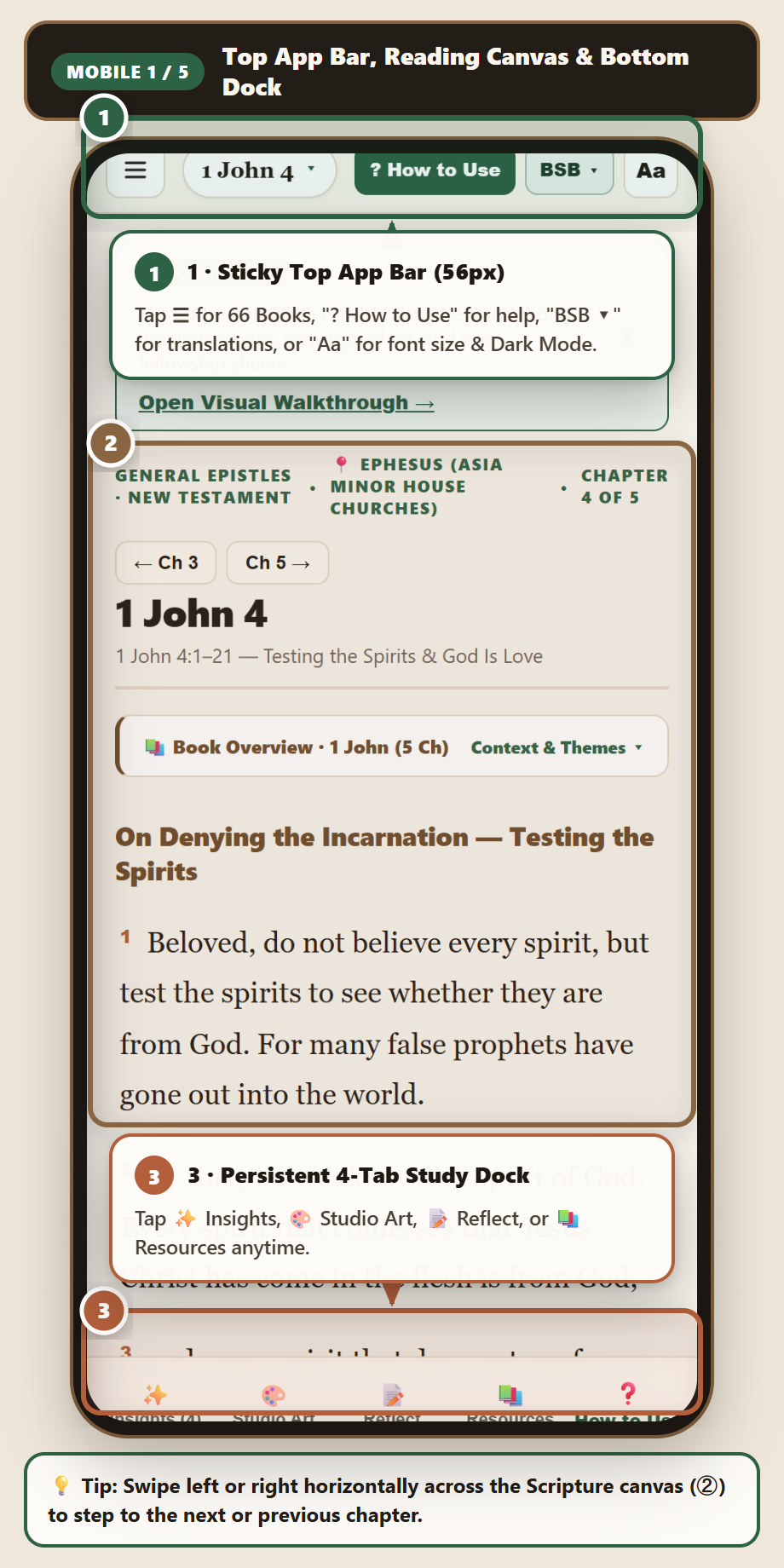
Mobile Step 1 — Top Bar, Reading Canvas & Bottom Dock Step 1 · Top Bar, Full-Screen Reading & Bottom Dock Tap ☰ for all 66 Books, swipe left/right to change chapters, or tap the bottom 4-tab Study Dock.
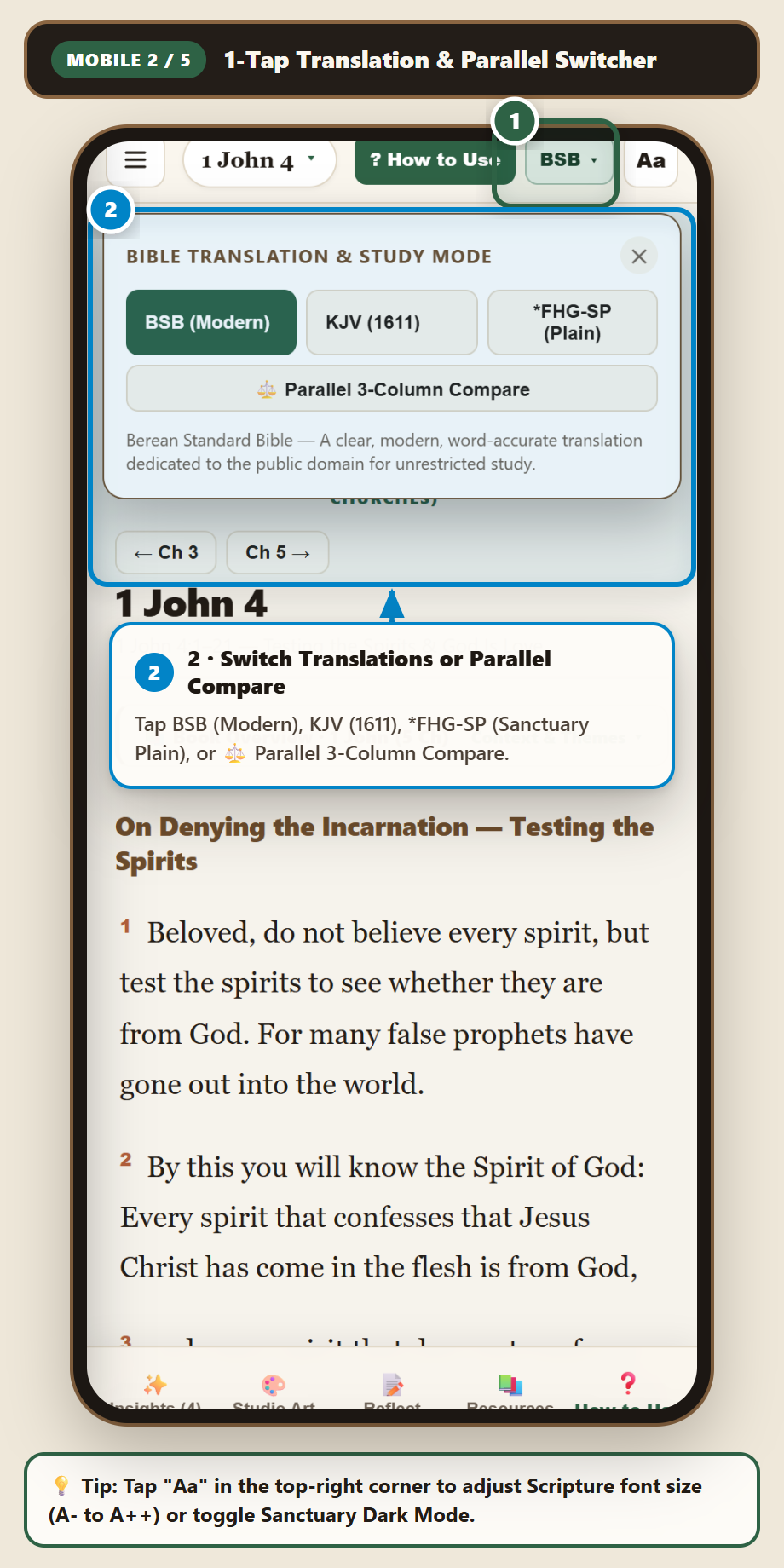
Mobile Step 2 — 1-Tap Translation & Parallel Switcher Step 2 · 1-Tap Translation & Parallel Switcher Tap BSB ▾ to switch between BSB, KJV (1611), *FHG-SP (Plain), or ⚖️ Parallel 3-Column Compare.
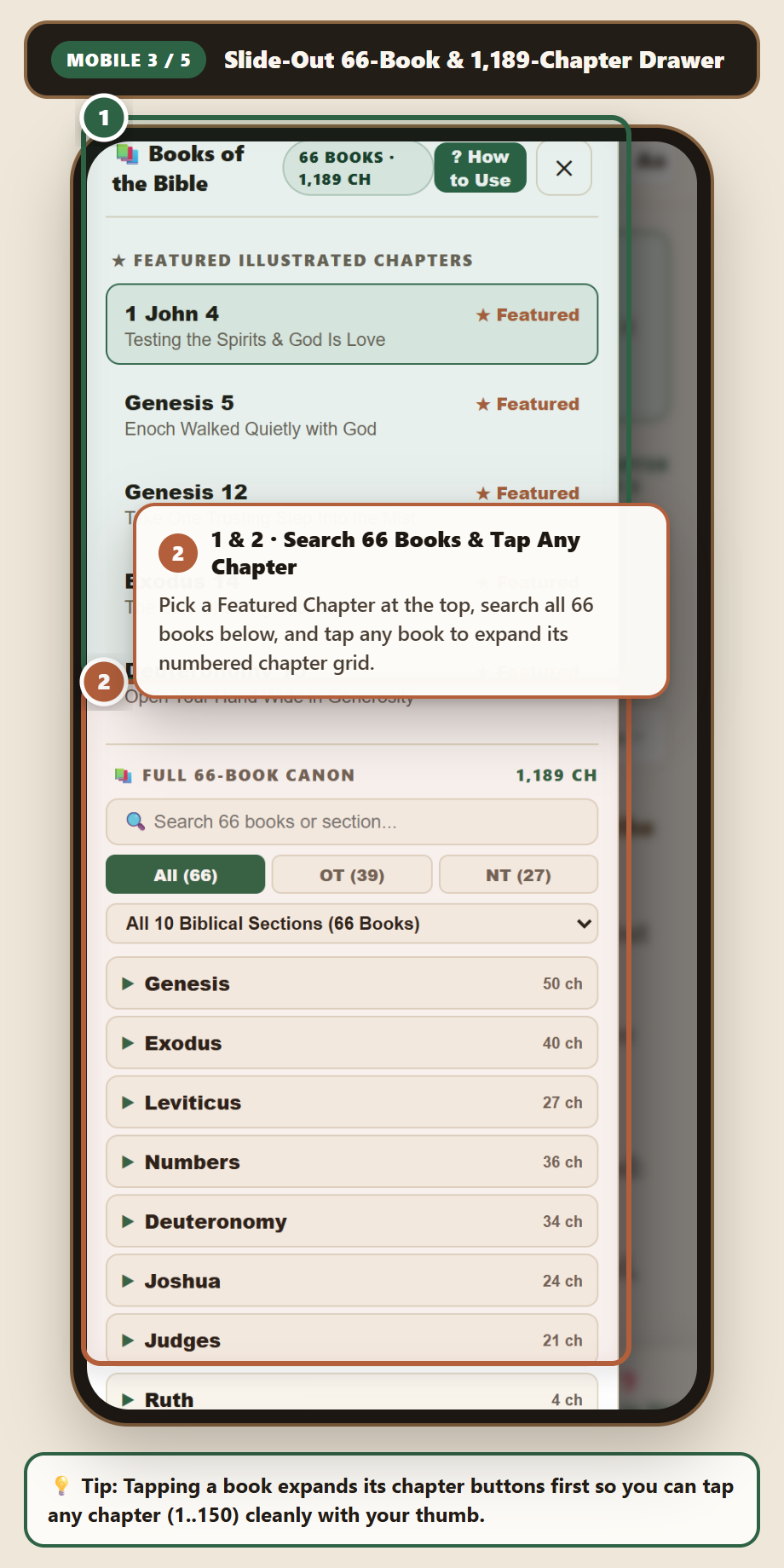
Mobile Step 3 — Slide-Out 66-Book & 1,189-Chapter Drawer Step 3 · Slide-Out 66-Book & 1,189-Chapter Drawer Search all 66 books, filter OT/NT, and tap any book to expand its numbered chapter buttons.
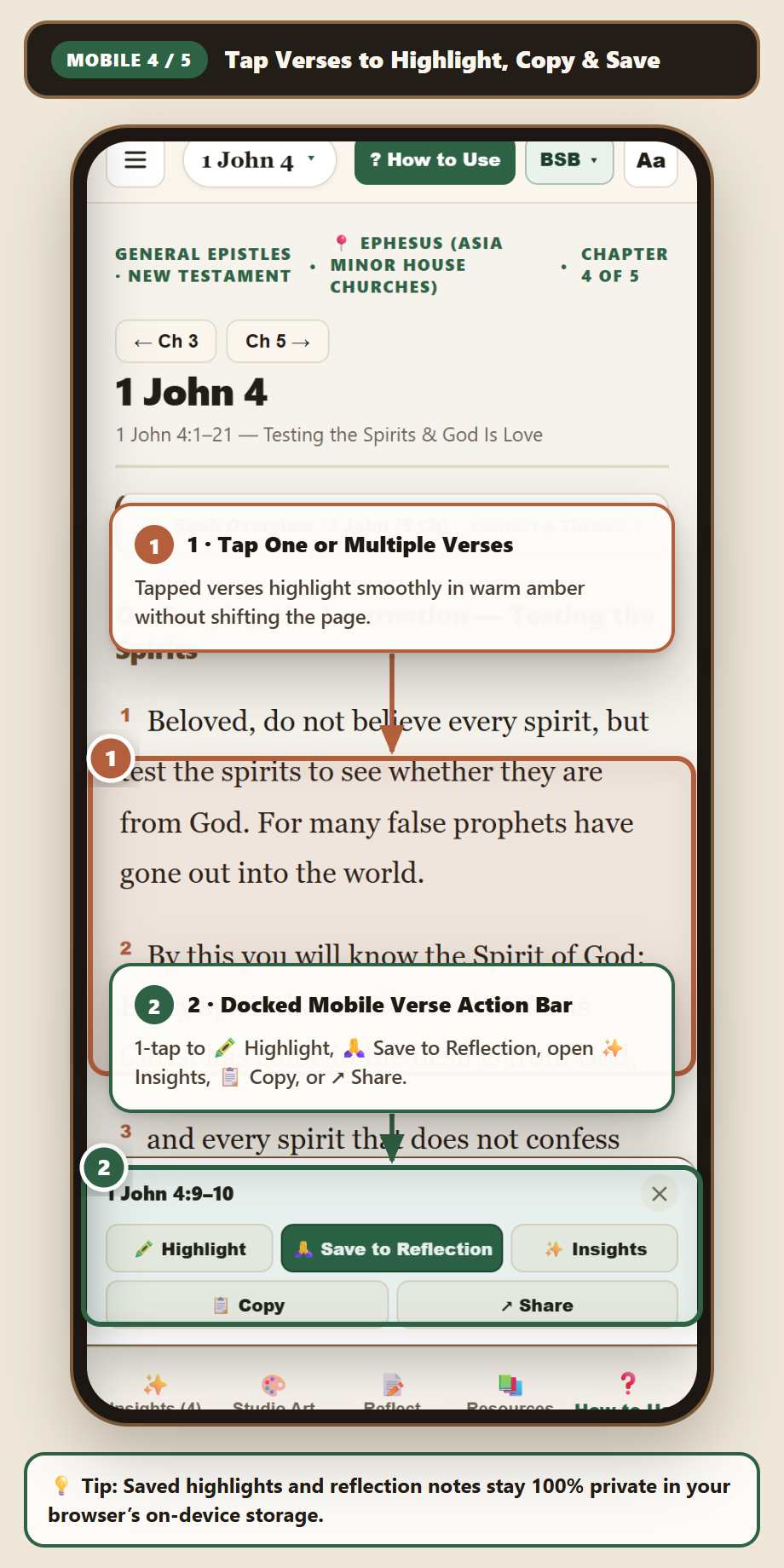
Mobile Step 4 — Tap Verses to Highlight, Copy & Save Step 4 · Tap Verses to Highlight, Copy & Save Tap any verse(s) to slide up the bottom action bar: 🖍️ Highlight, 🙏 Save to Reflection, 📋 Copy, or ↗ Share.
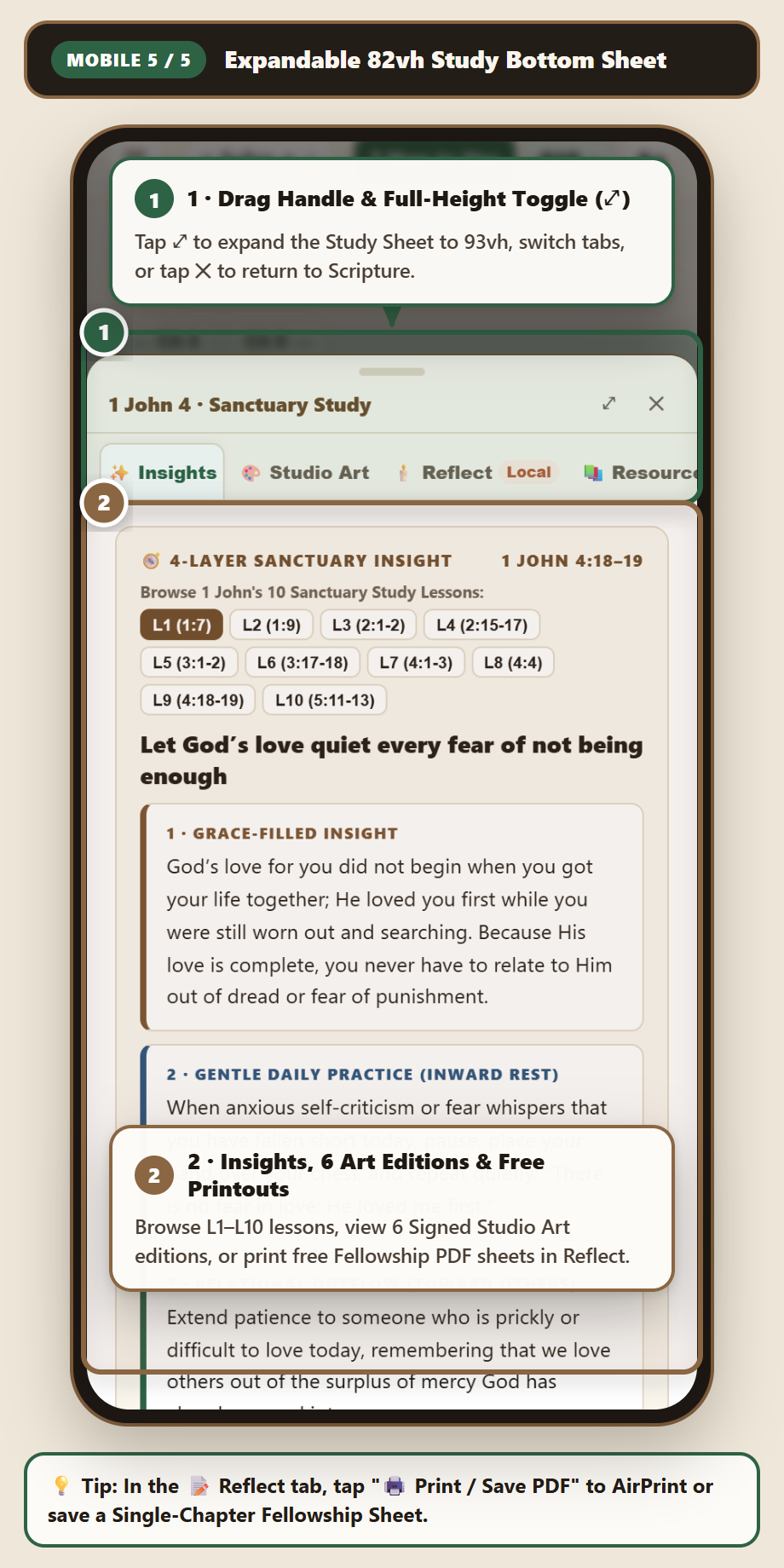
Mobile Step 5 — Expandable 82vh Study Bottom Sheet Step 5 · Expandable 82vh Study Bottom Sheet Read 4-Layer Grace Insights, view 6 Signed Studio Art editions, and print free Fellowship PDF sheets.
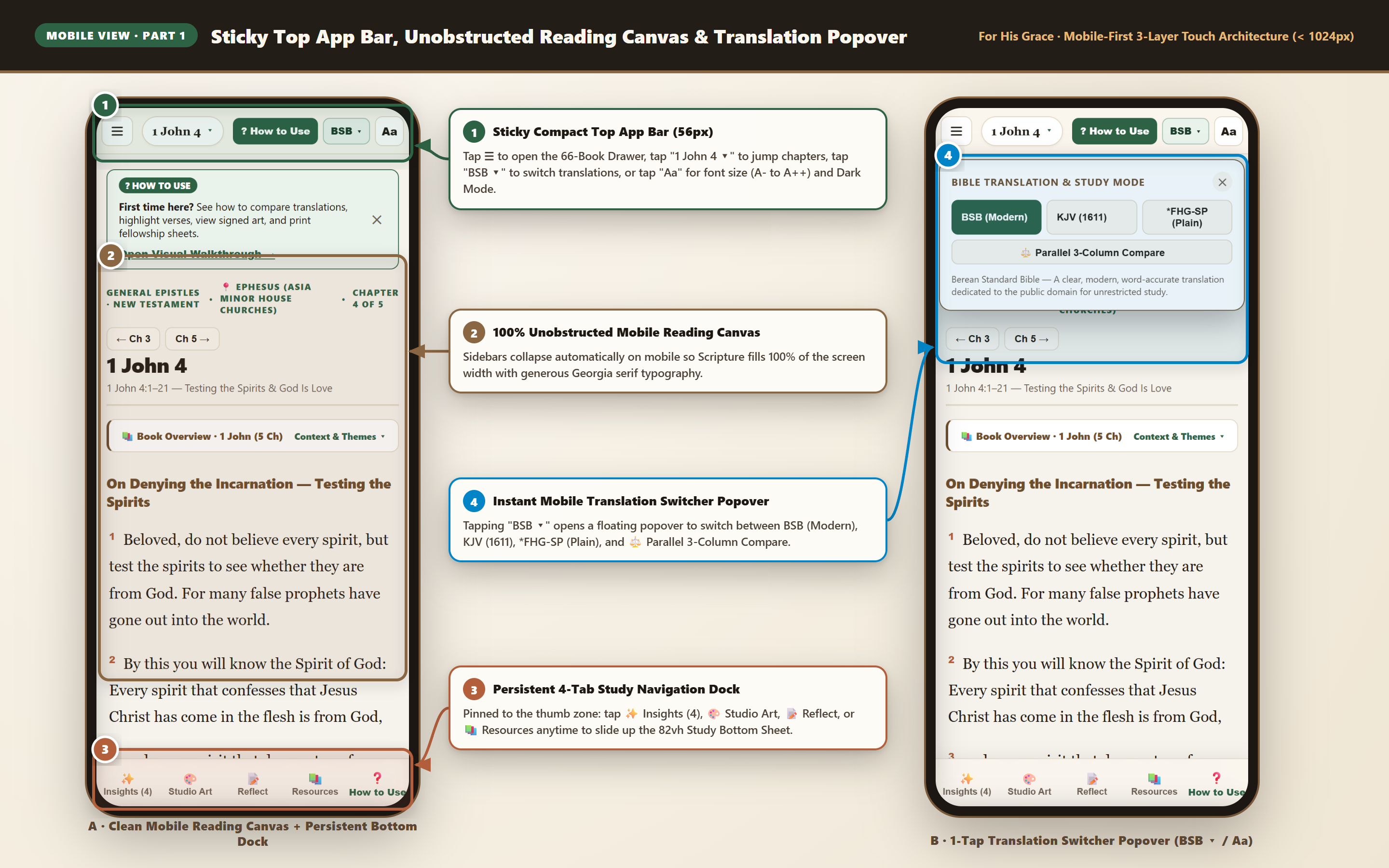
Mobile 01 of 03

Mobile Sticky Top App Bar, Full-Width Reading Canvas & Translation Popover

⚡ Open Mobile-Ready Reader →
Mobile 01 — Sticky Top App Bar, Unobstructed Reading Canvas & Translation Popover
📱 Viewport: Mobile 390×844 (@2x Retina Composite) · Layer 1 & Layer 2 Touch UI 🔍 Click to Enlarge

On phones and compact tablets (≤ 1024px), both sidebars collapse into off-canvas touch drawers so 100% of your screen width is dedicated to Scripture.

1
Sticky Compact Top App Bar (56px) Tap ☰ or 1 John 4 ▾ to open the 66-Book Drawer, tap BSB ▾ to switch translations, or tap Aa to adjust font size (A- / Default / A+ / A++) and Dark Mode.
2
100% Unobstructed Mobile Reading Canvas + Swipe Navigation Read comfortably with generous line height, or swipe left/right horizontally across the reading canvas to step to the next or previous chapter.
3
Persistent 4-Tab Bottom Study Navigation Dock Pinned to the bottom thumb zone: tap ✨ Insights (4), 🎨 Studio Art, 📝 Reflect, or 📚 Resources anytime to slide up the Study Bottom Sheet.
4
1-Tap Translation Switcher Popover (Screen B) Tapping BSB ▾ drops down a clean touch popover to toggle BSB (Modern), KJV (1611), *FHG-SP (Plain), or ⚖️ Parallel 3-Column Compare.
Mobile 02 of 03

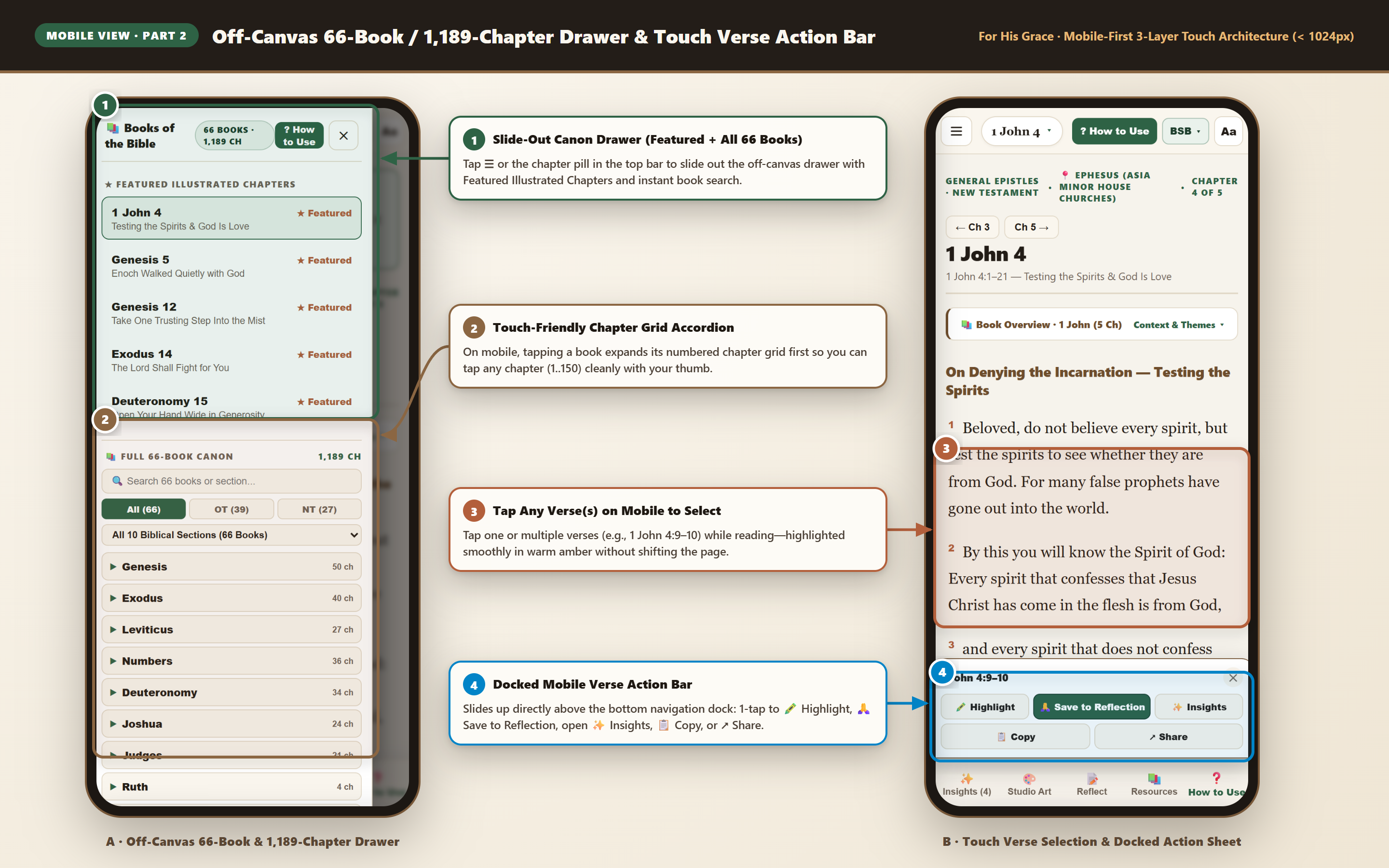
Mobile Off-Canvas 66-Book Drawer & Docked Touch Verse Action Bar

⚡ Try Mobile Navigation →
Mobile 02 — Off-Canvas 66-Book Drawer & Docked Touch Verse Action Bar
📱 Viewport: Mobile 390×844 (@2x Retina Composite) · Canon Drawer & Verse Actions 🔍 Click to Enlarge

Jumping to any of the 1,189 chapters or saving verses to your journal takes just two thumb taps on mobile—with zero accidental navigation.

1
Slide-Out 66-Book Canon Drawer (Screen A) Tap ☰ or the chapter reference pill in the top bar to slide out the off-canvas drawer containing Featured Illustrated Chapters, search, and all 66 books.
2
2-Step Touch Chapter Grid Accordion On mobile, tapping a book title expands its numbered chapter grid first (without immediately closing the drawer) so you can tap your exact target chapter cleanly.
3
Tap Any Verse(s) While Reading (Screen B) Tap one or more verses on the reading canvas to highlight them in warm amber.
4
Docked Mobile Verse Action Bar Slides up directly above the bottom navigation dock so your thumb can tap 🖍️ Highlight, 🙏 Save to Reflection, ✨ Insights, 📋 Copy, or ↗ Share.
Mobile 03 of 03

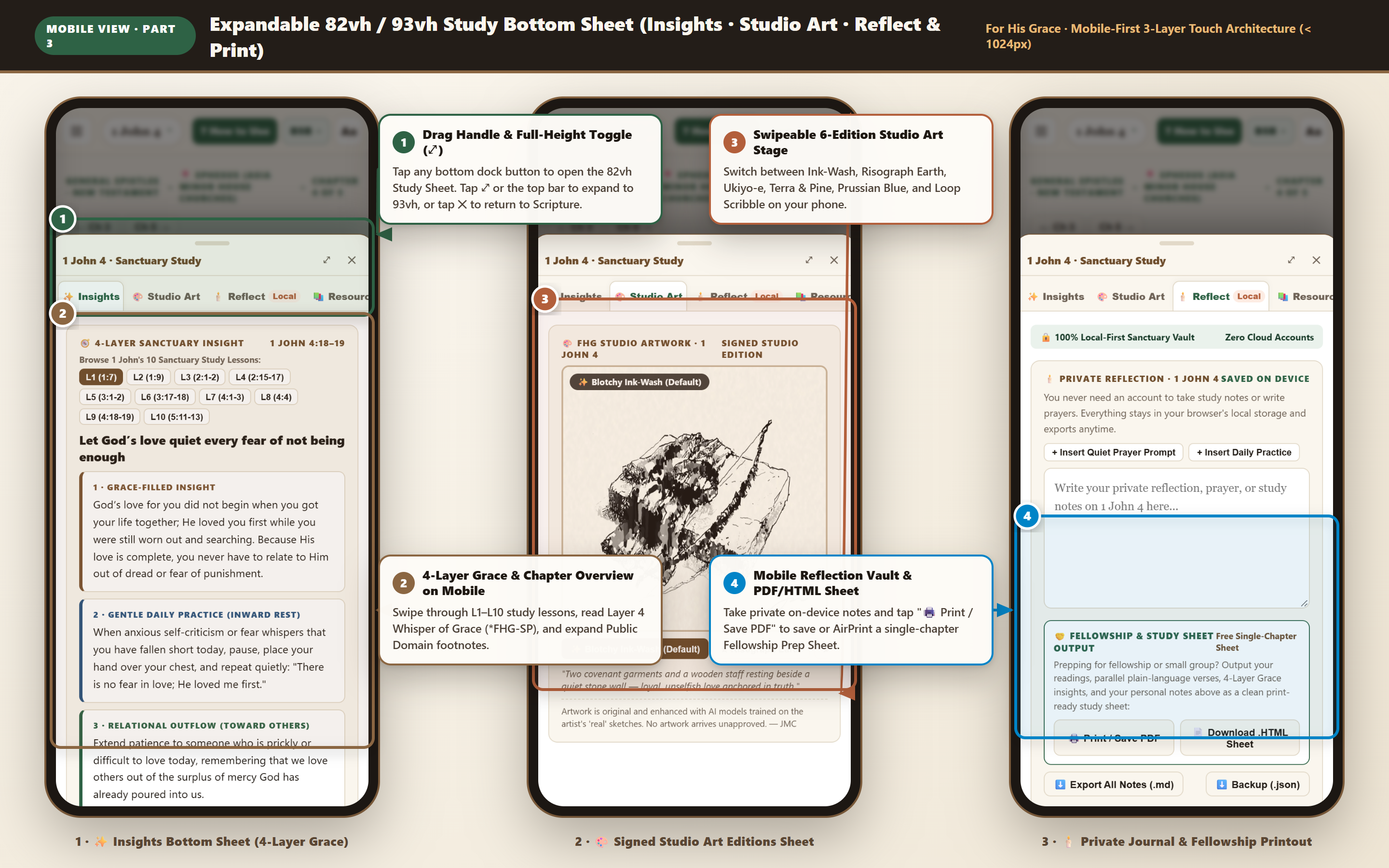
Expandable 82vh / 93vh Study Bottom Sheet (Insights · Studio Art · Reflect & Print)

⚡ Try Study Bottom Sheet →
Mobile 03 — Expandable 82vh / 93vh Study Bottom Sheet Across Insights, Studio Art & Reflect
📱 Viewport: Mobile 390×844 (@2x Retina 3-Phone Board) · Study Bottom Sheet States 🔍 Click to Enlarge

Tapping any button in the persistent bottom dock slides up the smooth Study Bottom Sheet—giving mobile readers the exact same commentary, artwork, and printing power as desktop users.

1
Drag Handle & Full-Height Expand Toggle (⤢) The sheet opens at 82vh so your Scripture context stays visible behind the backdrop. Tap ⤢ or the drag-handle bar to expand to 93vh, or swipe down on the header / tap ✕ to close.
2
Phone 1 — ✨ Insights Bottom Sheet Browse all 10 per-book lessons (L1–L10), read the 4-Layer Grace commentary, and expand the 1,189-Chapter Overview and footnotes.
3
Phone 2 — 🎨 Swipeable 6-Edition Studio Art Sheet Switch horizontally between all 6 Signed JMC Art Editions right on your phone screen.
4
Phone 3 — 🕯️ Mobile Reflection Vault & AirPrint / PDF Sheet Write private on-device study notes and tap 🖨️ Print / Save PDF to save or AirPrint a formatted Fellowship Prep Sheet straight from your phone.
Complete Capability Inventory

Everything Inside the Sanctuary Reader

Every tool is engineered to run with zero latency in your browser—requiring no login, displaying zero advertisements, and keeping your personal reflections 100% on your own device.

📚 1. Full 66-Book & 1,189-Chapter Canon Explorer

  • 5 Featured Illustrated Chapters: 1-click access to flagship illustrated studies (1 John 4, Genesis 5, Genesis 12, Exodus 14, and Deuteronomy 15).
  • Instant Canon Search & Testament Filters: Filter all 66 books by name or theme, toggle All (66) / OT (39) / NT (27), or browse by 10 Biblical Sections (Pentateuch, Historical, Wisdom, Prophets, Gospels, Epistles, Apocalypse).
  • Expandable Chapter Grids (1..150): Click any book to reveal its numbered chapter matrix, or step sequentially using ← Ch X-1 and Ch X+1 → buttons.
  • Collapsible Book Overview Banner: Every chapter header includes an expandable 📚 Book Overview · Context & Themes summary with core theological theme pills.

⚖️ 2. Multi-Translation & Parallel Comparison Engine

  • BSB (Berean Standard Bible): Clear, modern, word-accurate translation dedicated to the public domain for unrestricted study.
  • KJV (King James Version 1611/1769): Time-tested classical English literary anchor for traditional concordance cross-referencing.
  • *FHG-SP (FHG Sanctuary Plain): Original contemplative plain-language rendering trained on the author’s real poems and prayers and approved by JMC.
  • 3-Column Parallel Compare Mode: Renders BSB, KJV, and *FHG-SP side-by-side for every single verse in the chapter so you can compare literal phrasing and heart-level clarity at a glance.

🖍️ 3. Interactive Verse Selection & Highlight-to-Reflect

  • Zero-Shift Verse Selection: Click or tap one or multiple verses to highlight them in warm amber and slide up the contextual Verse Action Sheet.
  • Persistent On-Device Highlights (🖍️): Save verse highlights directly to your browser’s local storage across all 1,189 chapters.
  • 1-Click Save to Reflection (🙏): Append selected verses—with formatted book, chapter, verse, and translation citations—straight into your private chapter journal.
  • Floating “Praying Hands” Phrase Capture: Drag-select any specific phrase with your cursor to summon the floating 🙏 Save to Reflection popover button.

✨ 4. 4-Layer Grace Insights & 1,189-Chapter Overviews

  • 4-Layer Sanctuary Insight (L1–L10 Switcher): Every book includes 10 structured lessons delivering (1) Grace-Filled Insight, (2) Gentle Daily Practice, (3) Relational Outflow, and (4) 🕯️ Whisper of Grace & Quiet Prayer (*FHG-SP).
  • 1,189-Chapter Overviews & Footnotes: Plain-language chapter exposition synthesized from historic public-domain commentaries (Matthew Henry, JFB, F.B. Meyer, TSK) with verse-cluster pills, lexical word-frequency stats, and expandable footnotes (¹–⁵).
  • Book Context & Theological Themes: Every chapter includes an expandable Book Overview banner summarizing historical setting, authorship, and core themes.

🎨 5. 6 Signed Studio Art Editions (Approved by JMC)

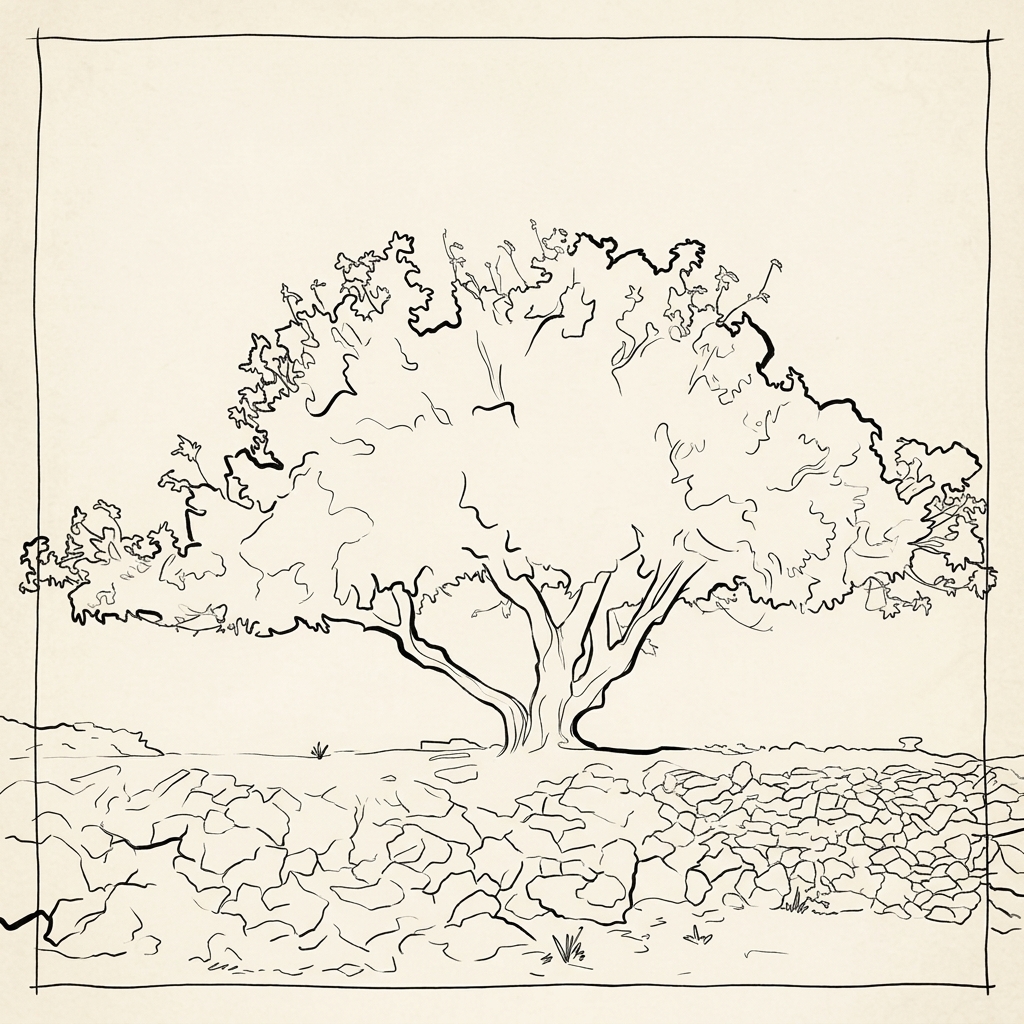
  • Original Fountain-Pen & Ink-Wash Lineage: Every featured passage and study lesson is paired with original artwork on warm archival parchment bearing the artist’s signature mark.
  • 6 Switchable Studio Editions: Toggle live between ✨ Blotchy Ink-Wash, ★ Risograph Earth, ★ Ukiyo-e × Risograph, 🌲 Terra & Pine, 🌊 Prussian Blue, and 🌀 Loop Scribble.
  • Visual Meditation Captions: Each illustration includes a quiet contemplative prompt connecting the visual composition to the Scripture passage.

🕯️ 6. Local-First Reflection Vault & Fellowship Printouts

  • 100% On-Device Sanctuary Vault: Notes auto-save locally per chapter in your browser—never transmitted to any external server.
  • 1-Click Prompt Seeders: Insert the chapter’s Quiet Prayer Prompt or Gentle Daily Practice into your journal with a single click.
  • Free Single-Chapter Fellowship Prep Sheet: Click 🖨️ Print / Save PDF or 📄 Download .HTML Sheet to generate a formatted small-group handout complete with parallel verses, 4-Layer Grace insights, artwork, your notes, and ruled discussion lines.
  • Full Portable Backup: Export your entire journal anytime as Markdown (.md) or JSON (.json).
Responsive Engineering

Desktop 3-Pane Workspace vs. Mobile 3-Layer Touch Architecture

The Sanctuary Reader automatically adapts its layout between widescreen desktop monitors (≥ 1025px) and mobile phones or tablets (≤ 1024px) so Scripture is never cramped.

Sanctuary Component 🖥️ Desktop View (≥ 1025px · 3-Pane Split Workspace) 📱 Mobile & Tablet View (≤ 1024px · 3-Layer Touch UI)
1. Top Navigation & Translation Controls Full Sanctuary Header with Praise Banner, Fig Tree Brand Link, 4-button Multi-Translation Bar (BSB · KJV · *FHG-SP · ⚖️ Parallel), 📘 Visual Guide, 🧩 Extension Demo, and 🕯️ Dark toggle. Sticky 56px Compact App Bar with ☰ Drawer button, 1 John 4 ▾ Reference Pill, BSB ▾ Translation Switcher Popover, and Aa Typography (A- to A++) + Dark Mode Popover.
2. 66-Book & 1,189-Chapter Canon Explorer Persistent Left Sidebar (295px) displaying Featured Illustrated Chapters, search box, OT/NT pills, 10 Biblical Sections dropdown, and expandable chapter grids. Off-Canvas Slide-Out Drawer (88vw) summoned via ☰ or the top reference pill. Tapping a book expands its touch-friendly chapter grid first; tapping a chapter loads Scripture and auto-closes the drawer.
3. Center Scripture Reading Canvas Generous central reading column (1fr) with adjustable serif typography, collapsible Book Overview banner, and 3-column side-by-side Parallel Compare grid. 100% full-width unobstructed reading canvas with horizontal left/right touch-swipe gestures to step cleanly between previous and next chapters.
4. 4-Tab Study Companion (Insights · Art · Reflect · Resources) Persistent Right Side Panel (445px) synchronized live as you switch books, chapters, or study lessons. Pinned 4-button Bottom Study Navigation Dock in the thumb zone that launches an expandable 82vh / 93vh Study Bottom Sheet with drag handle and full-height toggle (⤢).
5. Contextual Verse Actions Floating pill bar centered at the bottom of the viewport + floating 🙏 Save to Reflection cursor popover on text selection. Docked full-width touch action bar positioned directly above the bottom navigation dock with horizontally scrollable action pills.
1-Click Interactive Presets

Launch Directly Into Any Sanctuary Feature

Click any preset card below to open the live Sanctuary Reader pre-configured for that exact passage, translation mode, study lens, or companion tab.